Local service business owners are not wrong when they say, “Google Ads does not work for us.” One plumbing company I audited last year spent close to 3,200 dollars in a single month and could only track 42 phone calls. Out of those calls, less than a dozen were real leads. The rest were wrong numbers, existing customers, or people who never picked up when the team called back.
On paper, they were paying around 5.26 dollars per click and roughly 70.11 dollars per lead. In reality, more than 60 percent of their budget was going to clicks and form fills that never had a chance to turn into booked jobs. The problem was not that Google Ads is broken. The problem was that the campaign structure, landing pages, and follow up process were quietly destroying the return on every dollar.
In most local markets, you are competing against national lead sellers, lazy agencies, and a few sharp competitors. That means you cannot afford to let Google decide everything for you. You must understand the hidden math behind your campaigns.
If you spend 2,000 dollars in a month and your average cost per click is 5 dollars, that is 400 clicks. If only 5 percent of visitors turn into leads, you get 20 leads. If your team closes 30 percent of those leads into paying jobs, you book 6 jobs. If your average job value is 350 dollars, that is 2,100 dollars in revenue on 2,000 dollars in ad spend. You barely broke even and that is before overhead and staff.
Shift a few numbers and the story changes completely. Keep the same 2,000 dollar budget and 5 dollar clicks, but raise your landing page conversion rate from 5 percent to 15 percent, and your close rate from 30 percent to 40 percent. Now 400 clicks turn into 60 leads. At 40 percent close rate, that is 24 jobs. At 350 dollars per job, you are at 8,400 dollars in revenue from the same 2,000 dollar ad spend. That is the difference between turning Google Ads off in frustration and using it as a predictable growth engine.
Why most local Google Ads campaigns fail
Most local service campaigns fail for three repeating reasons:
- Broad, generic keywords that pull in the wrong searchers.
- Weak or generic landing pages that do not speak to urgent local pain.
- No proper conversion tracking, so nobody knows which keywords and ads produce real leads.
- Slow response time, so even good leads go cold before anyone follows up.
I often see accounts where 63 percent of spend goes to search terms that the business would never want as a customer. Think people searching “cheap”, “DIY”, or looking for information instead of someone to hire. Without negative keywords and tight match types, you pay for everyone.
Healthy benchmark numbers
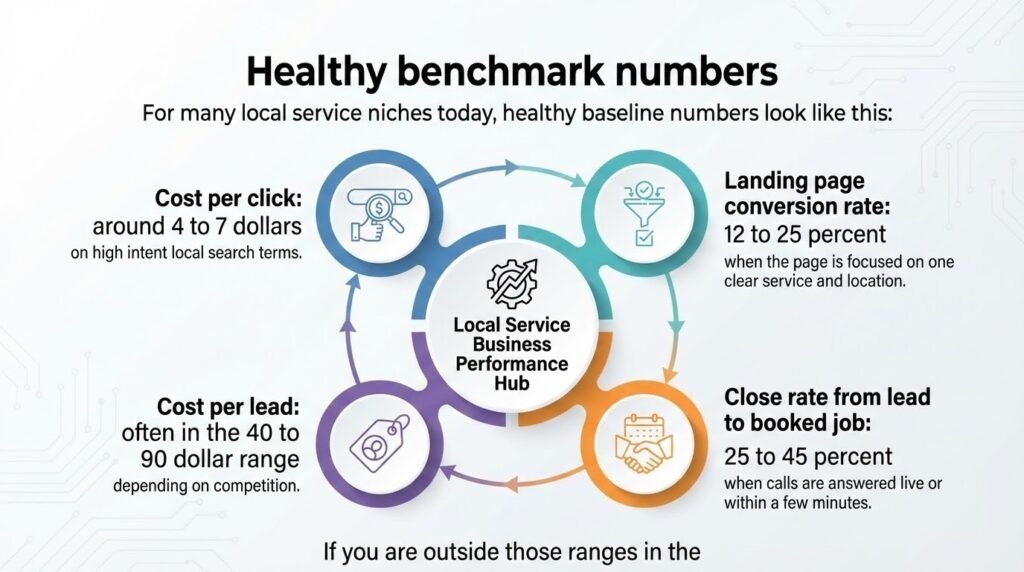
For many local service niches today, healthy baseline numbers look like this:
- Cost per click: around 4 to 7 dollars on high intent local search terms.
- Landing page conversion rate: 12 to 25 percent when the page is focused on one clear service and location.
- Cost per lead: often in the 40 to 90 dollar range, depending on competition.
- Close rate from lead to booked job: 25 to 45 percent when calls are answered live or within a few minutes.
If you are outside those ranges in the wrong direction, there is usually something broken in your campaigns, landing pages, or sales process.
Framework to fix a broken account
Use this simple step by step framework to rescue a weak Google Ads account:
- Lock in one core service and location per campaign.
- Build tight ad groups around high intent keywords only.
- Send traffic to a single purpose landing page with one call to action.
- Install full conversion tracking for calls, forms, and chats.
- Add a call answering and follow up process that responds within minutes, not hours.
- Review search term reports weekly and block low intent phrases.
- Adjust bids and budgets based on real cost per lead and close rate.
Red flags and competitive urgency
Pay attention to red flags like rising cost per lead, falling conversion rates, or days where the phone simply goes quiet even though the budget is still spending. These are signals that your targeting, messaging, or tracking needs immediate attention.
While you wait and hope that performance improves on its own, one or two competitors in your area are tightening their tracking, improving landing pages, and training their team to handle leads faster. The gap between your results and theirs will not stay small. Once they understand their numbers, they can afford to bid more aggressively and take the best local search terms away from you.
Your next 30 days
Over the next 30 days, focus on three priorities:
- Clean up your campaigns so that every dollar chases only the right searcher.
- Fix your landing pages so more of those visitors become real leads.
- Tighten your response time so your team talks to new leads while they still have their credit card in hand.
If you want help turning wasted ad spend into booked jobs, AdsByAlam.com specializes in managing and fixing Google Ads for local service businesses. With more than 2.3 million dollars in ad spend managed and well over fifteen thousand tracked leads generated, the playbook is already tested. The only question is whether you want your Google Ads account to stay a cost or become a dependable lead source.
Frequently Asked Questions
1. Why do my Google Ads get lots of clicks but very few leads?
Most local campaigns are set up to chase cheap clicks instead of qualified inquiries. Broad keywords, weak location targeting, and no negative keywords pull in the wrong searchers. When you fix targeting and tighten your keywords around service + location + intent, you trade junk clicks for fewer but higher-quality leads.
2. How much should a local service business expect to pay per lead?
It depends on the niche and city, but a healthy cost per lead is usually in a range where your profit per closed job is at least 4–5 times higher than what you spend to get that lead. If you are paying premium click prices and still closing only a small fraction of inquiries, the issue is usually your targeting, landing page, or follow up, not just the budget.
3. Can Google Ads work if my monthly budget is small?
Yes, but the campaign has to be focused. With a smaller budget, you cannot afford to target every service and every city. You pick your highest value services and the locations that convert best, then protect the budget with tight match types, negatives, and clear qualifying copy on the page.
4. Why do leads tell me they clicked on multiple competitors before calling me?
Most local searchers open several ads and tabs at once. If your landing page looks similar to everyone else, or if you respond slowly, you blend into the crowd. A clear headline, proof, and a fast response workflow help you win the comparison even when your competitors show up beside you.
5. How fast do I need to respond to new leads from Google Ads?
Speed is one of the biggest hidden levers. When you call or message back within a few minutes, you catch people while they are still in “search mode.” Waiting an hour or more gives your competitors time to quote, follow up, and book the job before you even reply.
6. What should I fix first if my Google Ads “don’t work”?
Start with the basics: correct conversion tracking, clear goals per campaign, tight location and keyword targeting, and a landing page that matches the ad promise. Once those are in place, you can refine bids, schedules, and audiences instead of guessing.